

View jobs
To view jobs in a queue, use the W&B App:- Navigate to the W&B App at https://wandb.ai/home.
- Select Launch in the Applications section of the left sidebar.
- Select the All entities dropdown and select the entity the launch job belongs to.
- Expand the collapsible UI from the Launch Application page to view a list of jobs added to that specific queue.
The launch agent creates a run when it executes a launch job. In other words, each run listed corresponds to a specific job in that queue.
job-source-launch_demo-canonical. The job is in a queue called Start queue. The first run in the queue is called resilient-snowball and the second run is called earthy-energy-165.
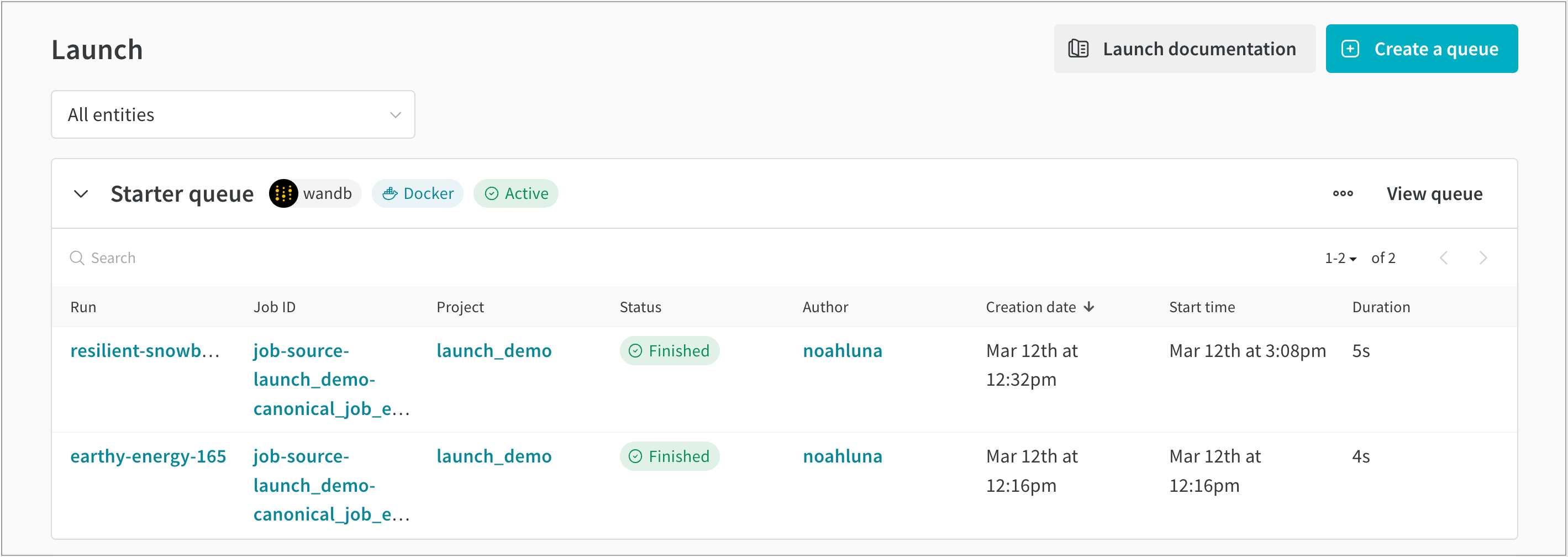
- Run: The name of the W&B run assigned to that job.
- Job ID: The name of the job.
- Project: The name of the project the run belongs to.
- Status: The status of the queued run.
- Author: The W&B entity that created the run.
- Creation date: The timestamp when the queue was created.
- Start time: The timestamp when the job started.
- Duration: Time, in seconds, it took to complete the job’s run.
List jobs
View a list of jobs that exist in a project with the W&B CLI. Use thewandb job list command and provide the name of the project and entity the launch job belongs to with the --project and --entity flags, respectively.
Replace [ENTITY] with your W&B entity, and replace [PROJECT-NAME] with the name of the project the launch job belongs to.