> ## Documentation Index
> Fetch the complete documentation index at: https://wb-21fd5541-css-tab-borders.mintlify.site/llms.txt
> Use this file to discover all available pages before exploring further.
# Build an evaluation
> Learn how to build an evaluation pipeline with Weave Models and Evaluations
export const GitHubLink = ({url}) =>
GitHub source
;
export const ColabLink = ({url}) =>
Try in Colab
;
This tutorial walks you through building an end-to-end evaluation pipeline in Weave so you can measure and track the quality of an LLM application as you iterate on it. Evaluations help you compare changes against a consistent set of examples and detect regressions before they reach users. This tutorial targets developers who build LLM-powered applications and want a repeatable way to test them.
Weave provides built-in support for tracking evaluations with [`Model`](/weave/guides/core-types/models) and [`Evaluation`](/weave/guides/core-types/evaluations) classes. The APIs make minimal assumptions, so they fit a range of use cases.
## What you'll learn
This guide shows you how to:
* Set up a `Model`.
* Create a dataset to test an LLM's responses against.
* Define a scoring function to compare model output to expected outputs.
* Run an evaluation that tests the model against the dataset using the scoring function and an additional built-in scorer.
* View the results of the evaluation in the Weave UI.
By the end, you'll have a working evaluation pipeline that scores an example model against a dataset and logs the results to Weave.
## Prerequisites
* A [W\&B account](https://wandb.ai/signup)
* Python 3.10+ or Node.js 18+
* Required packages installed:
* **Python**: `pip install weave openai`
* **TypeScript**: `npm install weave openai`
* An [OpenAI API key](https://platform.openai.com/api-keys) set as an environment variable.
## Import the necessary libraries and functions
Import the following libraries into your script:
```python Python lines theme={null}
import json
import openai
import asyncio
import weave
from weave.scorers import MultiTaskBinaryClassificationF1
```
```typescript TypeScript twoslash lines theme={null}
// @noErrors
import * as weave from 'weave';
import OpenAI from 'openai';
```
## Build a `Model`
With the libraries in place, the next step is to define the model you want to evaluate.
In Weave, [`Models` are objects](/weave/guides/core-types/models) that capture both the behavior of your model or agent (logic, prompt, parameters) and its versioned metadata (parameters, code, micro-config) so you can track, compare, evaluate, and iterate reliably.
When you instantiate a `Model`, Weave automatically captures its configuration and behaviors and updates the version when changes occur. This lets you track its performance over time as you iterate on it.
To declare a `Model`, subclass `Model` and implement a `predict` function definition that takes one example and returns the response.
The following example model uses OpenAI to extract the names, colors, and flavors of alien fruits from input sentences.
```python Python lines {1,5} theme={null}
class ExtractFruitsModel(weave.Model):
model_name: str
prompt_template: str
@weave.op()
async def predict(self, sentence: str) -> dict:
client = openai.AsyncClient()
response = await client.chat.completions.create(
model=self.model_name,
messages=[
{"role": "user", "content": self.prompt_template.format(sentence=sentence)}
],
)
result = response.choices[0].message.content
if result is None:
raise ValueError("No response from model")
parsed = json.loads(result)
return parsed
```
```typescript TypeScript twoslash lines {9} theme={null}
// @noErrors
// Note: weave.Model is not supported in TypeScript yet.
// Instead, wrap your model-like function with weave.op
import * as weave from 'weave';
import OpenAI from 'openai';
const openaiClient = new OpenAI();
const model = weave.op(async function myModel({datasetRow}) {
const prompt = `Extract fields ("fruit": , "color": , "flavor") from the following text, as json: ${datasetRow.sentence}`;
const response = await openaiClient.chat.completions.create({
model: 'gpt-3.5-turbo',
messages: [{ role: 'user', content: prompt }],
response_format: { type: 'json_object' }
});
return JSON.parse(response.choices[0].message.content);
});
```
The `ExtractFruitsModel` class inherits from (or subclasses) `weave.Model` so Weave can track the instantiated object. `@weave.op` decorates the `predict` function to track its inputs and outputs.
You can instantiate `Model` objects like this:
```python Python lines theme={null}
# Set your team and project name
weave.init('[YOUR-TEAM]/eval_pipeline_quickstart')
model = ExtractFruitsModel(
model_name='gpt-3.5-turbo-1106',
prompt_template='Extract fields ("fruit": , "color": , "flavor": ) from the following text, as json: {sentence}'
)
sentence = "There are many fruits that were found on the recently discovered planet Goocrux. There are neoskizzles that grow there, which are purple and taste like candy."
print(asyncio.run(model.predict(sentence)))
# if you're in a Jupyter Notebook, run:
# await model.predict(sentence)
```
```typescript TypeScript twoslash theme={null}
// @noErrors
await weave.init('eval_pipeline_quickstart');
const sentence = "There are many fruits that were found on the recently discovered planet Goocrux. There are neoskizzles that grow there, which are purple and taste like candy.";
const result = await model({ datasetRow: { sentence } });
console.log(result);
```
## Create a dataset
With a `Model` defined, you now need a dataset to evaluate it against. A [`Dataset`](/weave/guides/core-types/datasets) is a collection of examples stored as a Weave object. Publishing the dataset to Weave versions it and makes it reusable across evaluation runs.
The following example dataset defines three example input sentences and their correct answers (`labels`), and then formats them in a JSON table format that scoring functions can read.
This example builds a list of examples in code, but you can also log them one at a time from your running application.
```python Python lines theme={null}
sentences = ["There are many fruits that were found on the recently discovered planet Goocrux. There are neoskizzles that grow there, which are purple and taste like candy.",
"Pounits are a bright green color and are more savory than sweet.",
"Finally, there are fruits called glowls, which have a very sour and bitter taste which is acidic and caustic, and a pale orange tinge to them."]
labels = [
{'fruit': 'neoskizzles', 'color': 'purple', 'flavor': 'candy'},
{'fruit': 'pounits', 'color': 'bright green', 'flavor': 'savory'},
{'fruit': 'glowls', 'color': 'pale orange', 'flavor': 'sour and bitter'}
]
examples = [
{'id': '0', 'sentence': sentences[0], 'target': labels[0]},
{'id': '1', 'sentence': sentences[1], 'target': labels[1]},
{'id': '2', 'sentence': sentences[2], 'target': labels[2]}
]
```
```typescript TypeScript twoslash theme={null}
// @noErrors
const sentences = [
"There are many fruits that were found on the recently discovered planet Goocrux. There are neoskizzles that grow there, which are purple and taste like candy.",
"Pounits are a bright green color and are more savory than sweet.",
"Finally, there are fruits called glowls, which have a very sour and bitter taste which is acidic and caustic, and a pale orange tinge to them."
];
const labels = [
{ fruit: 'neoskizzles', color: 'purple', flavor: 'candy' },
{ fruit: 'pounits', color: 'bright green', flavor: 'savory' },
{ fruit: 'glowls', color: 'pale orange', flavor: 'sour and bitter' }
];
const examples = sentences.map((sentence, i) => ({
id: i.toString(),
sentence,
target: labels[i]
}));
```
Then create your dataset using the `weave.Dataset()` class and publish it:
```python Python lines {2} theme={null}
weave.init('eval_pipeline_quickstart')
dataset = weave.Dataset(name='fruits', rows=examples)
weave.publish(dataset)
```
```typescript TypeScript twoslash lines {3-6} theme={null}
// @noErrors
import * as weave from 'weave';
await weave.init('eval_pipeline_quickstart');
const dataset = new weave.Dataset({
name: 'fruits',
rows: examples
});
await dataset.save();
```
## Define custom scoring functions
Now that you have a model and a dataset, you need a way to measure how well the model performs on each example. Scoring functions compare the model's output to the expected target and produce the metrics that an evaluation reports.
When you use Weave evaluations, Weave expects a `target` to compare `output` against. The following scoring function takes two dictionaries (`target` and `output`) and returns a dictionary of boolean values that indicate whether the output matches the target. The `@weave.op()` decorator enables Weave to track the scoring function's execution.
```python Python lines theme={null}
@weave.op()
def fruit_name_score(target: dict, output: dict) -> dict:
return {'correct': target['fruit'] == output['fruit']}
```
```typescript TypeScript twoslash theme={null}
// @noErrors
import * as weave from 'weave';
const fruitNameScorer = weave.op(
function fruitNameScore({target, output}) {
return { correct: target.fruit === output.fruit };
}
);
```
For more information on making your own scoring function, see the [Scorers](/weave/guides/evaluation/scorers) guide.
In some applications, you may want to create custom `Scorer` classes. For example, you might create a standardized `LLMJudge` class with specific parameters (such as chat model or prompt), specific row scoring, and aggregate score calculation. For more information, see the tutorial on defining a `Scorer` class in [Model-based evaluation of RAG applications](/weave/tutorial-rag#optional-defining-a-scorer-class).
## Use a built-in scorer and run the evaluation
With the model, dataset, and a custom scorer in place, you're ready to wire everything together into an evaluation run.
Along with custom scoring functions, you can also use [Weave's built-in scorers](/weave/guides/evaluation/builtin_scorers). In the following evaluation, `weave.Evaluation()` uses the `fruit_name_score` function defined in the previous section and the built-in `MultiTaskBinaryClassificationF1` scorer, which computes [F1 scores](https://en.wikipedia.org/wiki/F-score).
The following example runs an evaluation of `ExtractFruitsModel` on the `fruits` dataset using the two scoring functions and logs the results to Weave.
```python Python lines {3-10} theme={null}
weave.init('eval_pipeline_quickstart')
evaluation = weave.Evaluation(
name='fruit_eval',
dataset=dataset,
scorers=[
MultiTaskBinaryClassificationF1(class_names=["fruit", "color", "flavor"]),
fruit_name_score
],
)
print(asyncio.run(evaluation.evaluate(model)))
# if you're in a Jupyter Notebook, run:
# await evaluation.evaluate(model)
```
```typescript TypeScript twoslash lines {5-9} theme={null}
// @noErrors
import * as weave from 'weave';
await weave.init('eval_pipeline_quickstart');
const evaluation = new weave.Evaluation({
name: 'fruit_eval',
dataset: dataset,
scorers: [fruitNameScorer],
});
const results = await evaluation.evaluate(model);
console.log(results);
```
If you're running from a Python script, you'll need to use `asyncio.run`. However, if you're running from a Jupyter notebook, you can use `await` directly.
### Complete example
```python Python lines theme={null}
import json
import asyncio
import openai
import weave
from weave.scorers import MultiTaskBinaryClassificationF1
# Initialize Weave once
weave.init('eval_pipeline_quickstart')
# 1. Define Model
class ExtractFruitsModel(weave.Model):
model_name: str
prompt_template: str
@weave.op()
async def predict(self, sentence: str) -> dict:
client = openai.AsyncClient()
response = await client.chat.completions.create(
model=self.model_name,
messages=[{"role": "user", "content": self.prompt_template.format(sentence=sentence)}],
)
result = response.choices[0].message.content
if result is None:
raise ValueError("No response from model")
return json.loads(result)
# 2. Instantiate model
model = ExtractFruitsModel(
model_name='gpt-3.5-turbo-1106',
prompt_template='Extract fields ("fruit": , "color": , "flavor": ) from the following text, as json: {sentence}'
)
# 3. Create dataset
sentences = ["There are many fruits that were found on the recently discovered planet Goocrux. There are neoskizzles that grow there, which are purple and taste like candy.",
"Pounits are a bright green color and are more savory than sweet.",
"Finally, there are fruits called glowls, which have a very sour and bitter taste which is acidic and caustic, and a pale orange tinge to them."]
labels = [
{'fruit': 'neoskizzles', 'color': 'purple', 'flavor': 'candy'},
{'fruit': 'pounits', 'color': 'bright green', 'flavor': 'savory'},
{'fruit': 'glowls', 'color': 'pale orange', 'flavor': 'sour and bitter'}
]
examples = [
{'id': '0', 'sentence': sentences[0], 'target': labels[0]},
{'id': '1', 'sentence': sentences[1], 'target': labels[1]},
{'id': '2', 'sentence': sentences[2], 'target': labels[2]}
]
dataset = weave.Dataset(name='fruits', rows=examples)
weave.publish(dataset)
# 4. Define scoring function
@weave.op()
def fruit_name_score(target: dict, output: dict) -> dict:
return {'correct': target['fruit'] == output['fruit']}
# 5. Run evaluation
evaluation = weave.Evaluation(
name='fruit_eval',
dataset=dataset,
scorers=[
MultiTaskBinaryClassificationF1(class_names=["fruit", "color", "flavor"]),
fruit_name_score
],
)
print(asyncio.run(evaluation.evaluate(model)))
```
```typescript TypeScript twoslash lines theme={null}
// @noErrors
import * as weave from 'weave';
import OpenAI from 'openai';
// Initialize Weave once
await weave.init('eval_pipeline_quickstart');
// 1. Define Model
// Note: weave.Model is not supported in TypeScript yet.
// Instead, wrap your model-like function with weave.op
const openaiClient = new OpenAI();
const model = weave.op(async function myModel({datasetRow}) {
const prompt = `Extract fields ("fruit": , "color": , "flavor": ) from the following text, as json: ${datasetRow.sentence}`;
const response = await openaiClient.chat.completions.create({
model: 'gpt-3.5-turbo',
messages: [{ role: 'user', content: prompt }],
response_format: { type: 'json_object' }
});
return JSON.parse(response.choices[0].message.content);
});
// 2. Create dataset
const sentences = [
"There are many fruits that were found on the recently discovered planet Goocrux. There are neoskizzles that grow there, which are purple and taste like candy.",
"Pounits are a bright green color and are more savory than sweet.",
"Finally, there are fruits called glowls, which have a very sour and bitter taste which is acidic and caustic, and a pale orange tinge to them."
];
const labels = [
{ fruit: 'neoskizzles', color: 'purple', flavor: 'candy' },
{ fruit: 'pounits', color: 'bright green', flavor: 'savory' },
{ fruit: 'glowls', color: 'pale orange', flavor: 'sour and bitter' }
];
const examples = sentences.map((sentence, i) => ({
id: i.toString(),
sentence,
target: labels[i]
}));
const dataset = new weave.Dataset({
name: 'fruits',
rows: examples
});
await dataset.save();
// 3. Define scoring function
const fruitNameScorer = weave.op(
function fruitNameScore({target, output}) {
return { correct: target.fruit === output.fruit };
}
);
// 4. Run evaluation
const evaluation = new weave.Evaluation({
name: 'fruit_eval',
dataset: dataset,
scorers: [fruitNameScorer],
});
const results = await evaluation.evaluate(model);
console.log(results);
```
## View your evaluation results
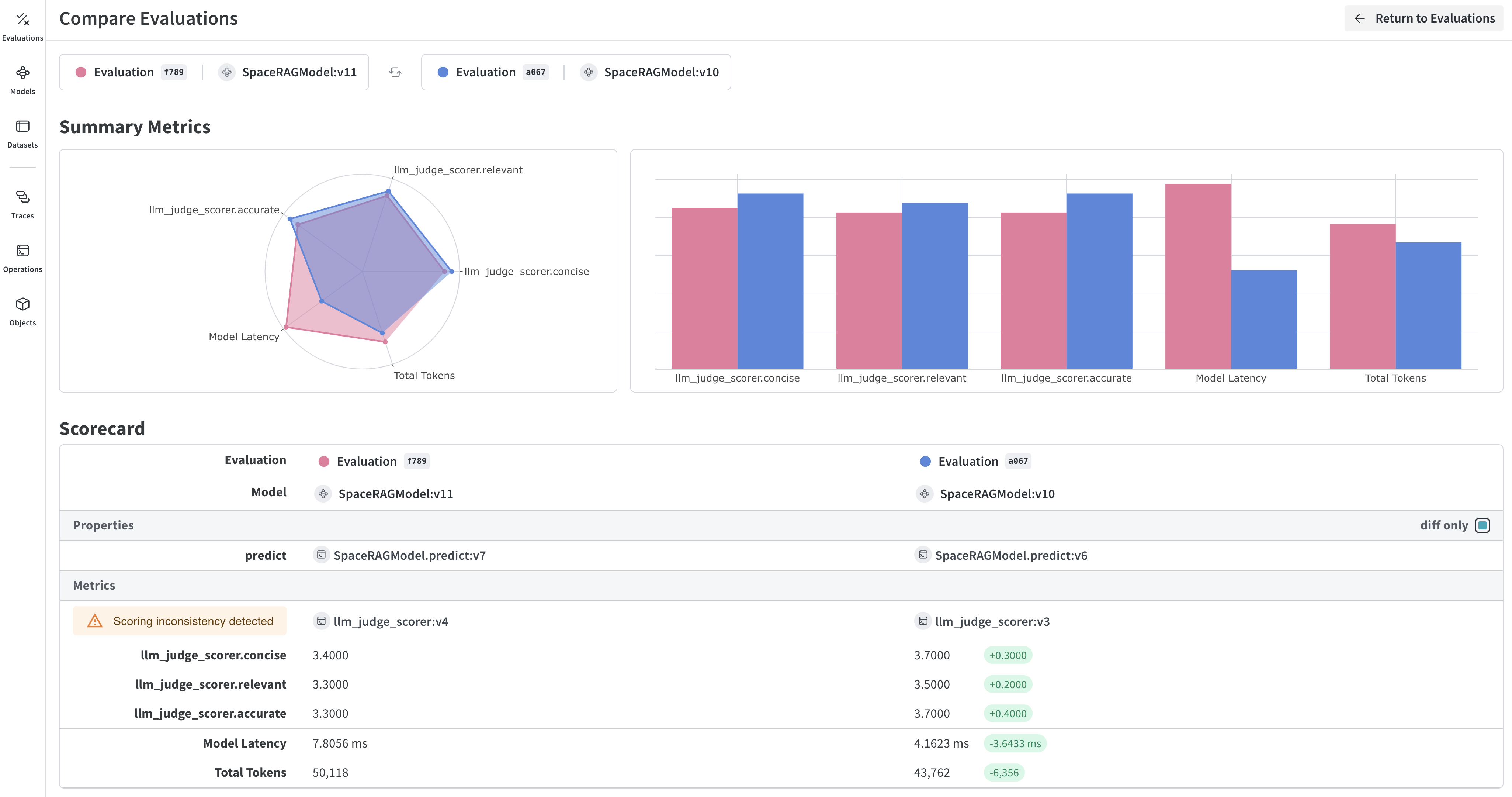
After the evaluation completes, you can inspect each prediction and scorer result in the Weave UI. Weave automatically captures traces of each prediction and score. To view the results, click the link that the evaluation prints.
## Learn more about Weave evaluations
You now have a complete evaluation pipeline. To go deeper into Weave's evaluation features, see the following resources:
* Learn more about how to [build and use scorers](/weave/guides/evaluation/scorers).
* Check out Weave's [built-in scoring functions](/weave/guides/evaluation/builtin_scorers).
* Learn about [Model-Based Evaluation](/weave/guides/evaluation/scorers#model-based-evaluation) for using LLMs as judges.
## Next steps
[Build a RAG application](/weave/tutorial-rag) to learn about evaluating retrieval-augmented generation.
 ## What you'll learn
This guide shows you how to:
* Set up a `Model`.
* Create a dataset to test an LLM's responses against.
* Define a scoring function to compare model output to expected outputs.
* Run an evaluation that tests the model against the dataset using the scoring function and an additional built-in scorer.
* View the results of the evaluation in the Weave UI.
By the end, you'll have a working evaluation pipeline that scores an example model against a dataset and logs the results to Weave.
## Prerequisites
* A [W\&B account](https://wandb.ai/signup)
* Python 3.10+ or Node.js 18+
* Required packages installed:
* **Python**: `pip install weave openai`
* **TypeScript**: `npm install weave openai`
* An [OpenAI API key](https://platform.openai.com/api-keys) set as an environment variable.
## Import the necessary libraries and functions
Import the following libraries into your script:
## What you'll learn
This guide shows you how to:
* Set up a `Model`.
* Create a dataset to test an LLM's responses against.
* Define a scoring function to compare model output to expected outputs.
* Run an evaluation that tests the model against the dataset using the scoring function and an additional built-in scorer.
* View the results of the evaluation in the Weave UI.
By the end, you'll have a working evaluation pipeline that scores an example model against a dataset and logs the results to Weave.
## Prerequisites
* A [W\&B account](https://wandb.ai/signup)
* Python 3.10+ or Node.js 18+
* Required packages installed:
* **Python**: `pip install weave openai`
* **TypeScript**: `npm install weave openai`
* An [OpenAI API key](https://platform.openai.com/api-keys) set as an environment variable.
## Import the necessary libraries and functions
Import the following libraries into your script: