> ## Documentation Index
> Fetch the complete documentation index at: https://wb-21fd5541-css-tab-borders.mintlify.site/llms.txt
> Use this file to discover all available pages before exploring further.
> W&B の実験管理を使って Cohere モデルをファインチューニングし、トレーニングメトリクスをログしてモデル性能を監視できます。
# Cohere ファインチューニング
W\&B を使うと、Cohere モデルのファインチューニング時のメトリクスと設定をログし、モデルのパフォーマンスを分析して把握したり、結果を同僚と共有したりできます。
この [Cohere のガイド](https://docs.cohere.com/page/convfinqa-finetuning-wandb) には、ファインチューニングの run を開始する方法の完全な例が掲載されています。[Cohere API ドキュメントはこちら](https://docs.cohere.com/reference/createfinetunedmodel#request.body.settings.wandb) で確認できます。
## Cohere ファインチューニングの結果をログする
W\&B ワークスペースに Cohere ファインチューニングの logging を追加するには、次の手順に従います。
1. W\&B APIキー、W\&B `entity`、`project` 名を指定して `WandbConfig` を作成します。APIキーは [https://wandb.ai/settings](https://wandb.ai/settings) で作成してください。
2. この設定を、モデル名、データセット、ハイパーパラメーターとともに `FinetunedModel` object に渡して、ファインチューニングの run を開始します。
```python theme={null}
from cohere.finetuning import WandbConfig, FinetunedModel
# W&B の情報を指定して設定を作成します
wandb_ft_config = WandbConfig(
api_key="",
entity="my-entity", # 指定した APIキー に関連付けられた有効な entity である必要があります
project="cohere-ft",
)
... # データセットとハイパーパラメーターを設定します
# Cohere でファインチューニングの run を開始します
cmd_r_finetune = co.finetuning.create_finetuned_model(
request=FinetunedModel(
name="command-r-ft",
settings=Settings(
base_model=...
dataset_id=...
hyperparameters=...
wandb=wandb_ft_config # ここで W&B の設定を渡します
),
),
)
```
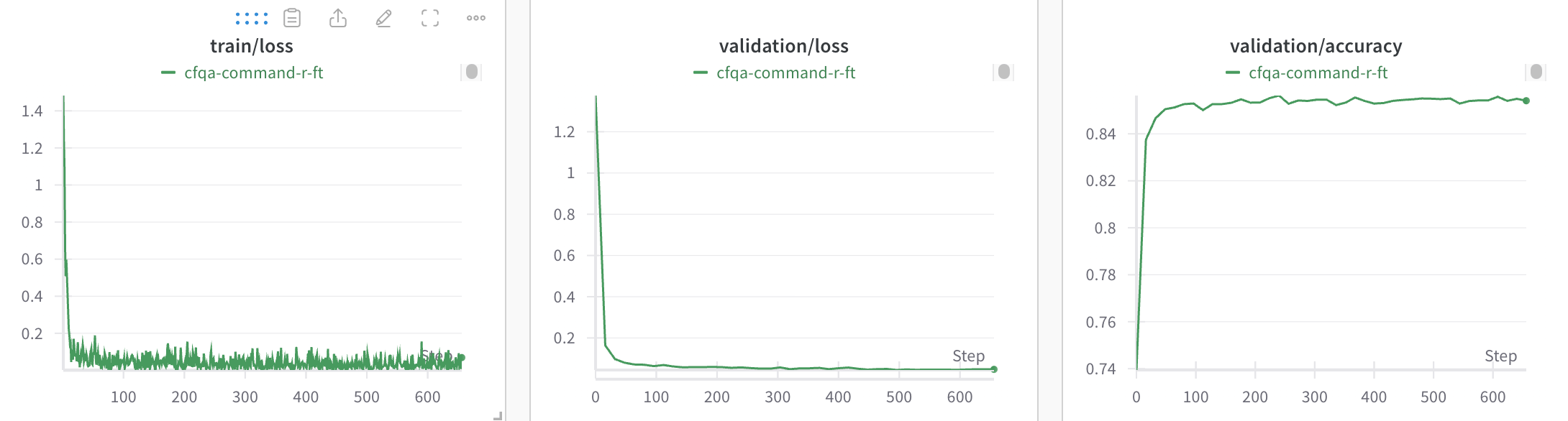
3. 作成した W\&B プロジェクトで、モデルのファインチューニングにおけるトレーニングと検証のメトリクス、およびハイパーパラメーターを確認します。
## run を整理する
W\&B の run は自動的に整理され、ジョブのタイプ、ベースモデル、学習率、そのほかの任意のハイパーパラメーターなどの設定パラメーターに基づいて、フィルターや並べ替えを行えます。
さらに、run の名前を変更したり、メモを追加したり、グループ化用のタグを作成したりできます。
## リソース
* [Cohere ファインチューニングのサンプル](https://github.com/cohere-ai/notebooks/blob/kkt_ft_cookbooks/notebooks/finetuning/convfinqa_finetuning_wandb.ipynb)